Why CNC Feed Rate Recommendations Aren't Speed Limits
Table of Contents
- Quick Take
- The Question We Get All the Time
- The Bit: Amana Tool 46172-K Compression Spiral
- Same Bit. Different Machines. Completely Different Results.
- Why Amana's Recommended Feed Rates Are Lower
- Why We Don't Simply Publish “Run This Bit at 1,000 IPM”
- Feed Rate Alone Is Not the Whole Story
- A Simple Chipload Example
- Why Running Too Slowly Can Also Be a Problem
- What Happens If You Push Too Fast?
- How to Safely Increase Your CNC Feed Rate
- What the 1,000 IPM Video Really Shows
- The Bottom Line
- How Fast Are You Running?
- FAQs
You’ve probably seen the videos.
A CNC router is ripping through sheet goods at what looks like an impossible speed. Chips are flying. Parts are finished in seconds. The cut quality is excellent.
Then you look up the feeds and speeds chart for that same bit and see a recommended feed rate that is a fraction of what you just watched.
So what gives?
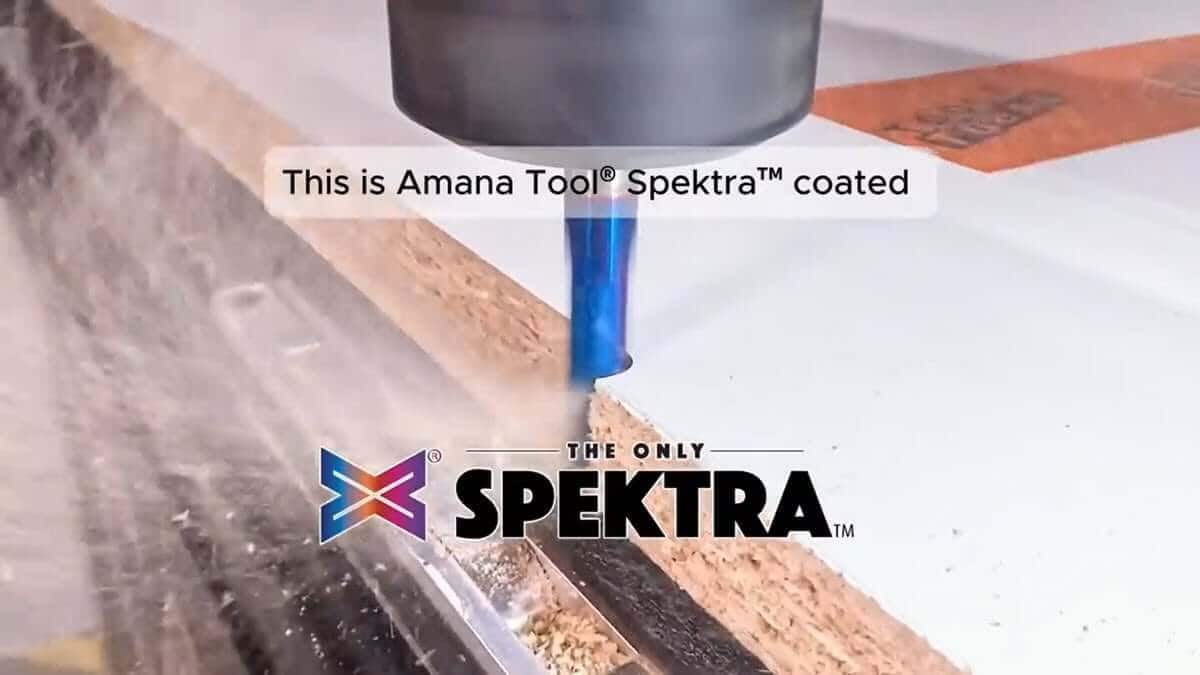
Recently, we shared a video of the Amana Tool 46172-K compression spiral running at approximately 1,000 inches per minute (IPM) on an industrial CNC router. Yet the published feeds and speeds recommendations for that bit start much lower — around 200 IPM for many applications, and roughly 400 IPM in MDF and laminate.
At first glance, those numbers seem contradictory.
They aren't.
The reality is that feed rate recommendations are not speed limits. They are starting points.
The feed chart tells you where to begin. Your machine determines where you can go from there.
Quick Take
- Manufacturer feeds and speeds are designed to work on a wide range of CNC machines.
- The same bit may run at 200 IPM on one machine and 1,000+ IPM on another.
- Machine rigidity, spindle power, hold-down, material, and chipload all affect achievable feed rates.
- Many CNC users are actually running too slowly, not too fast.
- Use published feeds and speeds as a starting point, then adjust based on your machine and results.
The feed chart is where you start. Machine capability determines where you finish.
The Question We Get All the Time
Whenever we post a video showing aggressive CNC cutting speeds, the comments are predictable:
"Why does the feed chart say 200 IPM if you're running 1,000?"
"Are the recommendations wrong?"
"Can I run my machine at those speeds?"
These are fair questions.
But they assume that feed rate is determined by the bit alone.
It isn't.
A CNC router bit is only one part of the cutting system. The machine matters just as much.
The Bit: Amana Tool 46172-K Compression Spiral
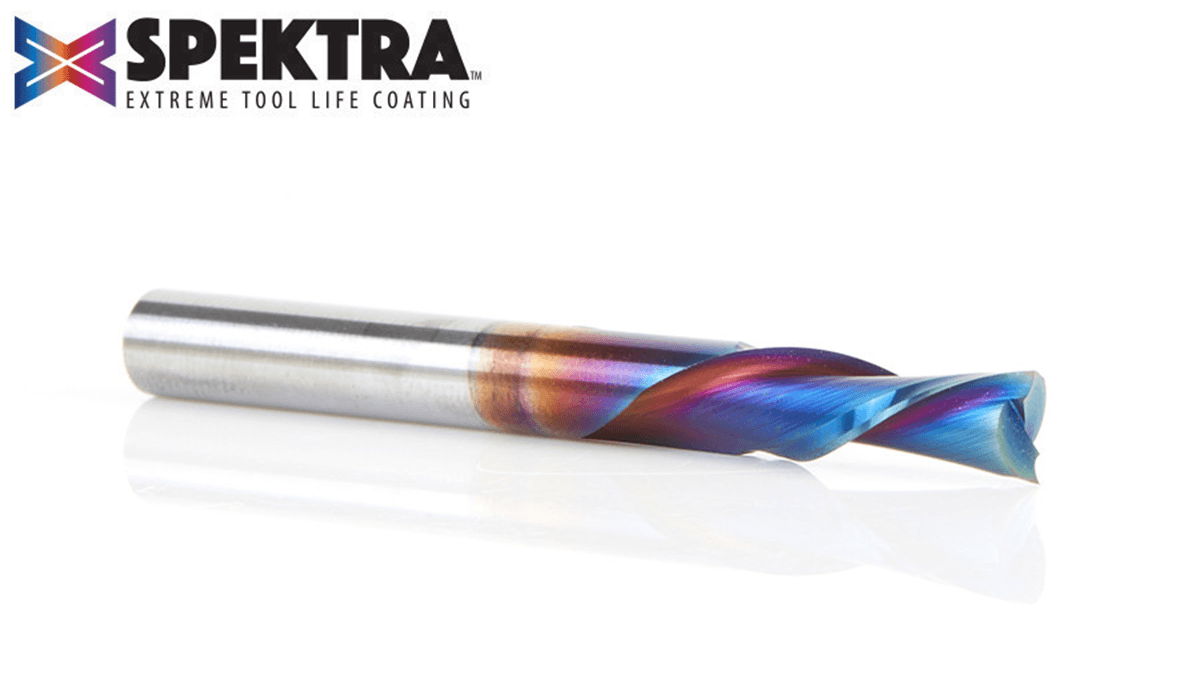
The Amana Tool 46172-K is a 3/8" diameter, 2-flute compression spiral CNC router bit with Spektra™ coating. It is designed for clean top and bottom edges in sheet goods and laminated materials, including MDF, melamine, laminated plywood, particle board, hardwood, softwood, and veneered plywood.
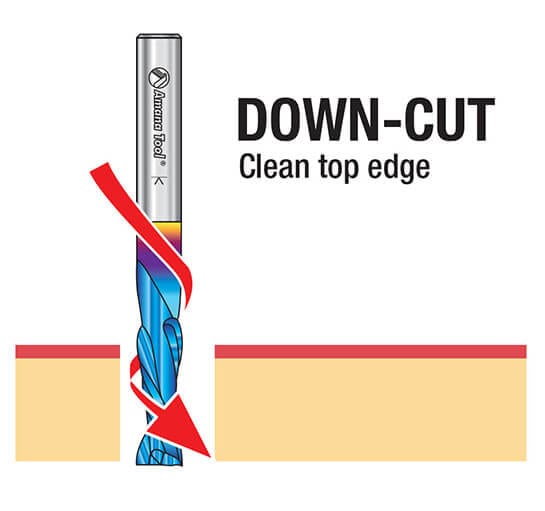
Compression bits are especially popular for CNC cabinetmaking, furniture parts, signs, and sheet-good production because they combine upcut and downcut cutting geometry in a single tool.
The lower portion of the bit pulls chips upward. The upper portion pushes material fibers downward. Together, that geometry helps reduce tearout on both the top and bottom faces of the material.
That makes the 46172-K a strong choice when edge quality matters — especially in double-sided laminated materials where tearout on either face can ruin the part.
Same Bit. Different Machines. Completely Different Results.
Imagine three CNC users buying the exact same compression bit.
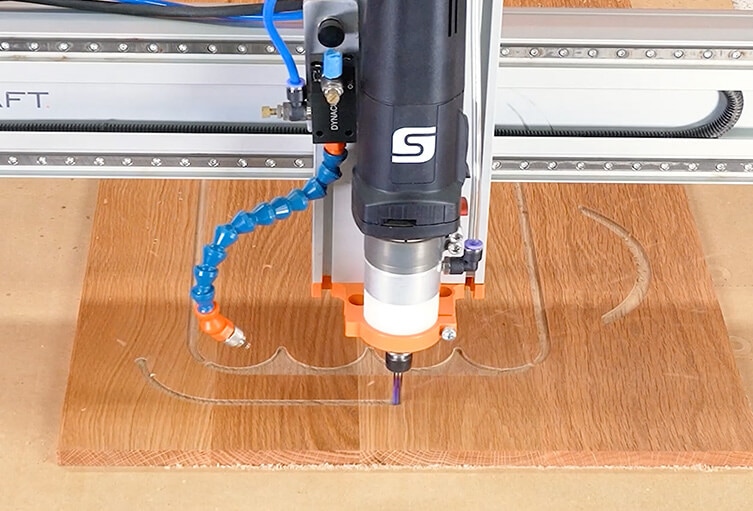
One runs a compact hobby CNC with a trim router.
One runs a larger prosumer machine with an upgraded spindle.
One runs a heavy-duty industrial CNC router with a production spindle and strong vacuum hold-down.
All three own the same bit.
All three may be cutting similar sheet goods.
But all three may need very different feed rates.
Why?
Because the bit does not determine the machine’s limits. The machine does.
| Setup | Typical Machine Characteristics | Feed Rate Reality |
|---|---|---|
| Desktop or lightweight CNC | Light frame, smaller motors, trim router or compact spindle, limited rigidity | Start near published recommendations and increase carefully |
| Prosumer CNC | More rigid frame, stronger motion system, upgraded spindle, better workholding | May run faster than the chart with proper setup and testing |
| Industrial CNC router | Heavy frame, powerful spindle, production motion control, vacuum table, strong chip evacuation | Can often push the same bit much faster under the right conditions |
In our 1,000 IPM example, the bit is running on a heavy-duty industrial Camaster CNC router. That kind of machine is built for production cutting. It can accelerate faster, resist vibration better, maintain spindle load more effectively, and keep the material secure under aggressive cutting conditions.
The bit didn’t suddenly become faster.
The machine allowed the bit to perform closer to its full potential.
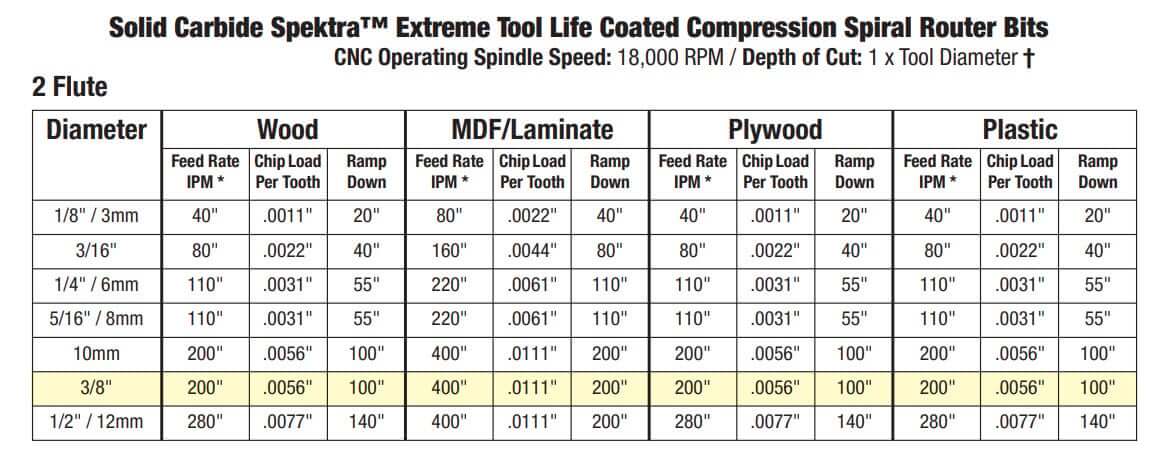
Why Amana's Recommended Feed Rates Are Lower
Feeds and speeds charts are designed to help a wide range of users get successful results.
That includes experienced CNC operators, but it also includes new CNC users, small-shop owners, hobbyists, schools, makerspaces, and people running lighter-duty machines.
If a manufacturer published only the most aggressive feed rate possible under ideal industrial conditions, that number would be useless — and possibly harmful — for many users.
For example, if a beginner sees “1,000 IPM” and enters that into their CAM software without understanding the machine requirements, several things can go wrong:
- The machine may not physically reach that feed rate.
- The frame may flex or vibrate under load.
- The spindle or router may not have enough power.
- The material may shift if hold-down is not strong enough.
- The bit may chatter, deflect, overheat, or break.
- The finished edge may be worse, not better.
That is why published feed rates are best understood as reliable starting points.
They are not meant to show the absolute top-end performance of the tool on an industrial machine. They are meant to help more users begin with a setup that has a reasonable chance of working.
Why We Don't Simply Publish “Run This Bit at 1,000 IPM”
Because for many CNC users, that would be bad advice.
A 1,000 IPM feed rate may be completely reasonable on a heavy industrial router cutting the right material with the right toolpath and hold-down.
But the same number may be unrealistic on a smaller machine.
It is not enough to ask:
“Can the bit run this fast?”
You also have to ask:
“Can my machine run this fast while maintaining accuracy, rigidity, chip evacuation, and cut quality?”
If the answer is no, the correct feed rate is lower — even if the bit itself is capable of more.
Feed Rate Alone Is Not the Whole Story
Feed rate is easy to focus on because it is simple and impressive.
1,000 IPM sounds fast.
200 IPM sounds conservative.
But feed rate by itself does not tell you whether a cut is correct.
To understand whether a feed rate makes sense, you also need to consider:
- RPM: How fast the spindle is rotating.
- Number of flutes: How many cutting edges are removing material.
- Chipload: How much material each flute removes per revolution.
- Depth of cut: How much material is being removed vertically.
- Width of cut: How much of the tool diameter is engaged.
- Material: MDF, plywood, hardwood, laminate, and melamine all cut differently.
- Machine rigidity: A rigid machine can maintain accuracy under load.
- Hold-down: The part must stay still at the chosen feed rate.
A feed rate that works beautifully in MDF may be too aggressive in hardwood.
A feed rate that works in a shallow finishing pass may be too aggressive in a full-depth profile cut.
Experienced CNC operators do not ask only, “How fast can this bit go?”
They ask, “What chipload am I trying to achieve, and can my machine hold that cut?”
A Simple Chipload Example
Chipload is the amount of material each cutting edge removes with each rotation of the tool.
The basic formula is:
Chipload = Feed Rate ÷ (RPM × Number of Flutes)
For a 2-flute bit running at 18,000 RPM:
- At 200 IPM, chipload is approximately 0.0055"
- At 300 IPM, chipload is approximately 0.0083"
- At 1,000 IPM, chipload is approximately 0.0278"
That is a huge difference.
On a small or lightweight CNC, the higher chipload may overload the machine, the spindle, the bit, or the hold-down.
On a heavy industrial CNC, that same aggressive cut may be realistic under the right conditions.
This is why the machine matters.
Why Running Too Slowly Can Also Be a Problem
Most new CNC users worry about running too fast.
But running too slowly can create problems too.
If the feed rate is too low for the RPM, the bit may rub instead of cut. Instead of producing healthy chips, it produces dust and heat.
That heat can lead to:
- Burning
- Premature tool wear
- Resin buildup
- Melted plastic edges
- Poor chip evacuation
- Shorter tool life
In many cases, improving a cut does not mean slowing down.
It means finding the right balance of feed rate, RPM, chipload, and machine capability.
The goal is to make chips, not dust.
What Happens If You Push Too Fast?
Higher feed rates increase the load on the entire cutting system.
The spindle has to maintain power. The machine has to stay rigid. The motors have to keep up. The material has to remain firmly held. The bit has to evacuate chips cleanly.
If any part of that system fails, the cut can go bad quickly.
Signs that you may be pushing too hard include:
- Chatter or vibration
- A rough or wavy edge
- Machine strain or unusual sound
- Burning or excessive heat
- Part movement
- Tool deflection
- Broken bits
High feed rates are not automatically better.
They are better only when the machine, material, toolpath, and setup can support them.
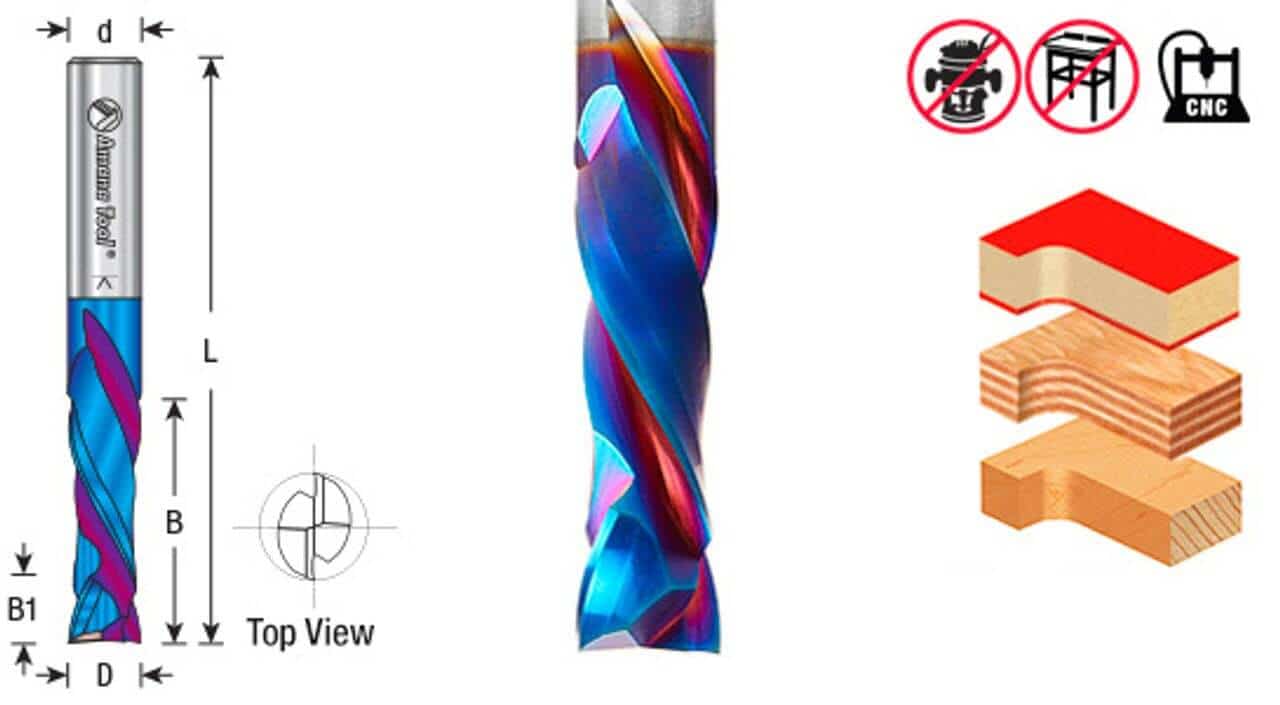 CNC Solid Carbide Spektra Coated Compression Spiral Router Bits Designed for CNC applications requiring high feed rates and flawless compression cuts. Particularly suitable for double-sided melamine or laminated material.
How to Safely Increase Your CNC Feed Rate
If your machine is capable of more than the published recommendations, there is nothing wrong with exploring higher feed rates.
Just do it methodically.
- Start with the manufacturer’s recommendation. Use the chart as your baseline, especially with a new bit, new material, or unfamiliar machine.
- Make a test cut. Use scrap material before committing to a finished part.
- Watch the chips. You want clean chips, not fine dust and not overloaded chunks.
- Listen to the machine. Chatter, squealing, or sudden changes in sound are warning signs.
- Increase feed rate in steps. Move gradually rather than jumping from 200 IPM to 1,000 IPM.
- Check the edge quality. A faster cut is not useful if the finish gets worse.
- Monitor heat and buildup. Look at the cut edge and inspect the bit after cutting.
- Confirm your hold-down. If the material moves, the feed rate is too aggressive for the setup.
The goal is not to hit the biggest number possible.
The goal is to find the fastest reliable feed rate that still produces excellent cut quality.
What the 1,000 IPM Video Really Shows
When you see the Amana 46172-K running at 1,000 IPM, the point is not that every CNC user should run that number.
The point is that the tool has significant performance potential when paired with the right machine.
On an industrial CNC router, with the right material, RPM, toolpath, depth of cut, chip evacuation, and hold-down, a high-quality compression bit can often be pushed far beyond the baseline chart recommendations.
That does not make the feed chart wrong.
It means the chart is a starting point, while the video is a demonstration of what is possible under production conditions.
The Bottom Line
Feed rate recommendations are not speed limits.
They are starting points designed to help a wide range of CNC users begin with practical, reliable settings.
From there, your real-world feed rate depends on your machine, your material, your spindle, your hold-down, your toolpath, and your experience.
That is why the same bit may run at 200 IPM in one shop and 1,000+ IPM in another.
The bit is the same.
The machine is not.
Start with the chart. Learn what a good cut sounds like. Watch your chips. Test carefully. Then increase your feed rate as your machine allows.
How Fast Are You Running?
Every CNC setup is different, and real-world experience is often the best teacher.
What is the fastest feed rate you have successfully run with a compression bit?
What machine were you using?
What material were you cutting?
We would love to hear what works in your shop.
FAQs
Why does Amana recommend 200 IPM if the bit can run at 1,000 IPM?
Published feed rates are designed to work across a wide range of CNC machines, including smaller and lighter-duty machines. A 1,000 IPM cut may be possible on an industrial CNC router, but that does not mean every machine can safely or accurately run that speed.
Can I run my CNC router bit faster than the feed chart recommends?
Possibly. Many users can increase feed rates beyond the starting recommendations, but only if the machine, spindle, hold-down, material, and toolpath can support it. Increase feed rate gradually and watch chip formation, edge quality, heat, and vibration.
Is running a CNC bit too slowly bad?
Yes. If the feed rate is too slow for the spindle speed, the bit may rub instead of cut. This creates heat, burning, resin buildup, poor chip evacuation, and premature tool wear.
What matters more: feed rate or chipload?
Chipload is usually the more useful measurement because it tells you how much material each cutting edge removes per rotation. Feed rate is important, but it should be considered together with RPM, number of flutes, material, and depth of cut.
Should beginners use the 1,000 IPM setting shown in CNC videos?
No. Beginners should start with the manufacturer’s published feeds and speeds, make test cuts, and increase gradually. A video shot on an industrial CNC router does not automatically apply to a smaller hobby or prosumer machine.